
Updated: Oct, 2026 | By Mr. David
Google Business Profile Setup Guide for Local SEO (2026)
Setting up a Google Business Profile (GBP) is one of the first practical steps a local business can take to establish a presence on Google Search and Google Maps. A properly created profile gives customers access to important business information such as your name, category, location or service area, phone number, website, hours, services, photos, and other profile details.
But creating the listing is only the beginning. For local SEO, the information needs to be accurate, complete, consistent, and useful to the people searching for your business. This guide walks you through the Google Business Profile setup process from checking for an existing listing and choosing the right business category to verification, profile completion, optimization, reviews, performance tracking, and common problems. It also explains how your GBP works alongside your website and broader local SEO efforts.
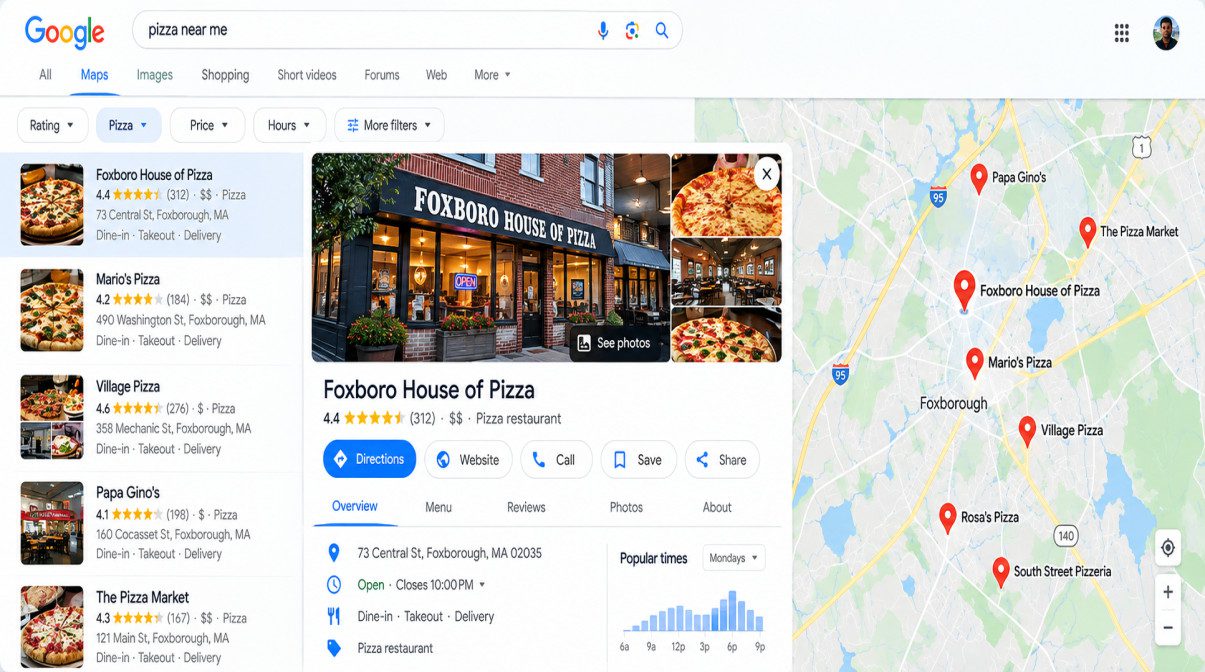
(Credit: Mr. David)
What is Google Business Profile setup?
Google Business Profile setup is the process of creating or claiming a business listing on Google, selecting the appropriate business category and business type, adding accurate business information, choosing a physical location or service area where applicable, completing verification, and filling out the profile with relevant details such as hours, services, photos, and contact information. After verification, the profile can be managed through Google Search and Google Maps and further optimized as part of a broader local SEO strategy.
Google Business Profile Setup: Quick Start
Before you start your Google Business Profile setup, gather the essential business information and decide how your business should appear on Google. A few minutes of preparation can make the setup smoother and help prevent basic problems with your business name, category, address, service area, contact details, or verification.
The process is straightforward: prepare your information, sign in with the appropriate Google account, check whether a profile already exists, create or claim the listing, enter the correct business details, choose the appropriate business type, and complete verification. After that, you can finish the remaining profile fields and begin optimizing the listing for local search.
Table of Contents
ToggleWhat you need before creating your profile
Have the following information ready before opening the Google Business Profile setup process:
- Your business name as it is actually used
- The most relevant primary business category
- Your physical business address, if customers visit your location
- Your service area, if you operate as a service-area business
- A business phone number
- Your website URL
- Regular and special business hours
- Basic business description
- Relevant photos, logo, and cover image
- Information needed for Business Profile verification
Keeping these details consistent with your website and other business listings creates a clearer local business entity and reduces avoidable data-entry mistakes.
What do you need to set up a Google Business Profile?
You typically need accurate business information such as your business name, category, location or service area, phone number, website, business hours, photos, and the information required to verify the Business Profile.
Google Business Profile Setup Checklist
Use one item per row:
- Business name
- Primary business category
- Business address or service area
- Phone number
- Website URL
- Business hours
- Business description
- Logo and business photos
- Verification information
Google Business Profile setup at a glance
The basic Google Business Profile setup follows a simple sequence:
Prepare → Sign in → Check → Create or claim → Enter business details → Choose business type → Add location or service area → Add contact details → Verify → Complete the profile
The important distinction is that creating a new profile is not always the first step. Search for the business first. An existing listing may already be present on Google, in which case you may need to claim it or request access rather than create a duplicate profile. The detailed guide below explains each stage and the available verification steps.
How do you set up a Google Business Profile?
Set up a Google Business Profile by signing in to a Google account, checking whether the business already has a listing, creating or claiming the profile, entering the business name and category, adding the address or service area and contact information, completing verification, and then filling in the remaining business details.
What Is Google Business Profile?
Google Business Profile (GBP) is Google’s business listing platform for eligible businesses that want to manage how their business information appears across Google Search and Google Maps. It brings essential details such as the business name, category, location or service area, phone number, website, hours, photos, services, and customer reviews into one business profile.
Google Business Profile is the current name of the product formerly known as Google My Business. For local businesses, it provides a central place to maintain important information that customers may use when deciding whether to call, visit, get directions, book a service, or learn more about the business.
Google Business Profile vs. Google My Business
Google Business Profile and Google My Business refer to the same Google business-listing product at different points in its history. Google changed the product name from Google My Business to Google Business Profile, so older SEO guides, tutorials, and references may still use “Google My Business” or “GMB.”
The underlying purpose remains familiar: businesses manage their presence on Google Search and Google Maps, including core business information, photos, reviews, services, and other available profile details. When researching setup instructions, prioritize current Google Business Profile terminology because older guides may contain outdated navigation or feature instructions.
Is Google Business Profile the same as Google My Business?
Yes. Google Business Profile is the current name for the product previously called Google My Business (GMB). It is used by eligible businesses to manage their business presence and information on Google Search and Google Maps.
How Google Business Profile supports Local SEO
A Google Business Profile gives a local business a structured place to present important information to people searching for its products or services. Accurate details about the business category, location, service area, hours, phone number, website, services, and reviews help customers understand what the business offers and how to contact or visit it.
GBP is only one part of Local SEO. Your website, local landing pages, citations, reviews, local links, and consistent business information should support the same business entity and location signals. This is why a well-set-up profile should be treated as part of a broader local search strategy rather than as a standalone ranking shortcut.
How does Google Business Profile help local SEO?
Google Business Profile supports local SEO by giving eligible businesses a managed presence on Google Search and Google Maps with information such as their business category, location or service area, hours, services, contact details, photos, and reviews. It works alongside the business website and other local SEO signals.
Which businesses can use Google Business Profile?
Google Business Profile is intended for eligible businesses that have in-person contact with customers. Depending on the business model, that can include a physical storefront, a service-area business that visits customers, or a business that serves customers at its location while also operating within a defined service area.
Storefront businesses
Businesses that receive customers at a physical location can generally display their eligible business location and associated information.
Service-area Businesses
Service-area businesses typically travel to customers rather than receiving them at a public storefront. Their profile setup therefore focuses on the areas they serve rather than presenting a customer-facing address when the business qualifies for that setup.
Hybrid Businesses
A hybrid business can serve customers at its physical location and also travel to customers. Its profile configuration needs to accurately represent both aspects of the operation.
Businesses that do not meet Eligibility Requirements
Businesses that operate entirely online without eligible in-person customer contact generally do not qualify for a Google Business Profile. Eligibility should be determined from Google’s current Business Profile guidelines before creating a listing.
Why Google Business Profile Matters for Local Search
A Google Business Profile matters for local search because it gives eligible businesses a dedicated presence on Google Search and Google Maps where potential customers can discover important business information. A complete and accurate profile can make it easier for people to understand what you offer, where you operate, when you are available, and how they can contact or visit you.
GBP should not be treated as a standalone ranking shortcut. Its real value comes from combining an accurate business profile with a strong website, relevant local content, consistent business information, genuine customer reviews, and other Local SEO signals.
Benefits for visibility, trust, and customer actions
A useful Business Profile brings together the information customers often need before contacting a local business. Depending on the profile and business type, customers may see the business name, category, location or service area, hours, phone number, website, photos, services, reviews, and available customer-action options.
These details serve three practical purposes: they improve how clearly the business is represented in local search, provide information that can build customer trust, and make it easier for people to take the next step.
How GBP Supports the Local Customer Journey
Visibility
Helps eligible businesses present important business information where customers search locally.
Trust
Provides accessible details such as reviews, photos, services, hours, and other business information.
Customer actions
Makes it easier for customers to contact the business, visit the website, request directions, book where available, or take another relevant action.
What are the main benefits of a Google Business Profile?
The main benefits of a Google Business Profile are stronger local search visibility, clearer business information, increased customer trust through details such as reviews and photos, and easier customer actions such as calls, website visits, directions, or bookings where available.
How GBP fits into a broader Local SEO strategy
A Business Profile works best as one part of a broader Local SEO strategy. Your GBP should reinforce the same business entity and core information represented on your website and across relevant local directories, citations, and other online references.
For example, the business name, address, phone number, services, locations, and website content should accurately describe the same organization. Relevant local landing pages, genuine reviews, local links, and useful location-based content can then support the overall local search presence rather than relying on the Business Profile alone.
Does Google Business Profile replace a business website for Local SEO?
No. A Google Business Profile does not replace a business website. GBP provides a business presence on Google Search and Google Maps, while the website can provide deeper information about the business, its services, locations, expertise, and customer journey. Both can support a broader Local SEO strategy.
Final Thoughts: Build a Stronger Local Presence With Google Business Profile
A strong Google Business Profile starts with accurate setup, but its value comes from how well you maintain and connect it with the rest of your local presence. Make sure the business information is correct, the profile accurately represents the business type and location, and customers can easily understand the services or products you provide.
From there, keep your profile current, manage genuine customer reviews, monitor meaningful performance data, and connect the Business Profile with useful website and local SEO content. A consistent approach helps create a clearer representation of the business across Google Search, Google Maps, your website, and other relevant local references.
What should you do after setting up a Google Business Profile?
After setting up a Google Business Profile, verify that the business information is accurate and complete, maintain the profile as the business changes, manage genuine customer reviews, monitor available performance data, and connect the profile with your website and broader Local SEO strategy.
The practical next step
Start by checking your profile against the real business: name, category, location or service area, phone number, website, hours, services, photos, and customer-facing information. Fix inaccuracies first, then build on that foundation with genuine reviews, useful website content, relevant local signals, and regular profile maintenance.
The objective is not to make the Business Profile look busy. It is to make the business easy to understand, easy to contact, and consistently represented wherever customers encounter it. That principle supports both traditional local search and newer answer-oriented search experiences.
How can I improve my local presence with Google Business Profile?
Improve your local presence by keeping your Business Profile accurate and complete, representing the correct business category and location, maintaining genuine customer reviews, publishing useful updates when appropriate, supporting the profile with relevant website content, and keeping important business information consistent across local sources.
Frequently Asked Questions (FAQ)
Google Business Profile setup often raises practical questions that are not fully answered during the initial creation process. The questions below bring together the main setup, eligibility, verification, optimization, reviews, Local SEO, troubleshooting, and performance topics covered throughout this guide.
The answers are intentionally concise and self-contained so they can work well for AEO and AI-powered search retrieval, while still giving readers enough context to take the next step. The supplied competitor material repeatedly includes questions around cost, eligibility, verification, multiple locations, reviews, photos, fake reviews, and profile management, which are incorporated and consolidated below.
Google Business Profile Basics and Eligibility
These questions cover the fundamentals readers should understand before creating or managing a profile. They explain what Google Business Profile is, how the former Google My Business terminology relates to it, and how business eligibility and operating models affect setup.
What is Google Business Profile?
Google Business Profile (GBP) is Google’s business listing platform for eligible businesses that want to manage how important business information is presented on Google Search and Google Maps. A profile can contain details such as the business name, category, address or service area, phone number, website, hours, photos, services, customer reviews, and other available features. For a local business, the profile provides a central place for customers to discover basic information and take available actions. It should therefore be treated as part of the business’s broader local search presence rather than as an isolated profile.
Is Google Business Profile free?
Yes, the basic Google Business Profile is a free business-listing product. A business does not need to pay Google simply to create or manage an eligible profile. There may be separate costs associated with advertising, third-party software, professional SEO services, website development, or other marketing activities, but those are different from the basic Business Profile itself. For a business owner, the more important consideration is making sure the profile is eligible, accurate, complete, and properly managed rather than assuming that paid activity is required to maintain the listing.
Is Google Business Profile the same as Google My Business?
Yes. Google Business Profile is the current name for the product that was previously known as Google My Business, often abbreviated as GMB. Older tutorials, SEO articles, screenshots, and software documentation may continue to use the older terminology, which can make current setup instructions confusing. When comparing older resources with current guidance, focus on the underlying business-profile function and verify that navigation and feature instructions still match the current Google experience.
Who can use Google Business Profile?
Google Business Profile is intended for eligible businesses that have the type of real-world customer interaction required for a Business Profile. This can include businesses that receive customers at a physical location, businesses that travel to customers, and certain businesses that operate in a combination of those ways. The important point is that eligibility depends on the actual business model rather than simply having a website, a business name, or an online presence. Before creating a profile, a business should make sure its operation fits Google’s applicable Business Profile requirements.
Can an online-only business use Google Business Profile?
An online-only business does not automatically qualify for a Google Business Profile simply because it has a website, sells products online, or communicates with customers remotely. Business Profile eligibility is tied to the way the business actually interacts with customers. This means an online store and a local business with an eligible physical or service-based operation should not be treated as identical cases. Businesses with an unusual or mixed operating model should check the applicable eligibility guidance before creating a listing rather than assuming that any online business can use GBP.
What is the difference between a storefront and a service-area business?
A storefront business serves customers at a physical, customer-facing location, while a service-area business primarily travels to customers rather than depending on a public storefront. This distinction affects how location information is represented in the Business Profile. A storefront generally needs accurate location information for customers who visit, whereas a service-area setup focuses on the geographic areas the business genuinely serves. The profile should reflect the real operating model because customers need an accurate understanding of where and how the business provides its services.
Google Business Profile Setup, Claiming, and Verification
This section addresses the practical steps involved in creating, claiming, and verifying a Business Profile. These answers are especially useful for businesses that discover an existing listing or encounter problems during verification.
How do I set up a Google Business Profile?
Start by signing in with the Google account intended to manage the business profile and then search Google Search or Google Maps for the business before creating anything new. If an appropriate listing does not exist, continue with the creation process; if an existing listing represents the business, use the applicable claim or access route instead. Enter the business name, category, business type, location or service area, phone number, website, and other required information, then complete the verification process offered for the profile. After verification, finish the remaining profile fields and review the customer-facing information for accuracy.
What should I do if my business already has a Google Business Profile?
Do not immediately create another profile when you discover an existing listing that represents your business. First determine whether the existing listing is already verified, whether it is being managed by another person, and whether you have the appropriate ownership or access. When the listing is the correct profile for the business, the appropriate route is generally to claim it or request access through the available process. This helps avoid unnecessary duplicate listings and keeps the business represented by the appropriate profile.
Should I create a new profile or claim an existing one?
The decision depends on whether a suitable profile already represents the business. If the business is eligible and no appropriate listing exists, creating a new profile may be the appropriate path. If an existing listing already represents the same business, claiming it or requesting access is generally preferable to creating another listing. Searching first is therefore an important part of GBP setup because it helps prevent duplicate profiles, conflicting business information, and unnecessary ownership problems.
How long does Google Business Profile verification take?
There is no single verification time that applies to every Business Profile because the process depends on the verification method and the circumstances of the particular listing. Google may present different verification options for different businesses, and some situations can require additional review or steps. Instead of planning around a fixed number of hours or days, follow the instructions shown for the profile and make sure the business information submitted during verification is accurate and consistent. Avoid repeatedly changing details while a verification issue is still being resolved.
What verification methods can Google Business Profile use?
The verification method can vary by business and by Business Profile. The supplied competitor material identifies options such as video, phone, and email verification, although the exact method offered can depend on the individual profile. The safest approach is to use the verification method Google presents for that listing and follow the instructions exactly. Businesses should also use genuine information and be prepared to provide the type of evidence requested by the verification process rather than assuming that every business will receive the same verification option.
What should I do if my Google Business Profile verification fails?
Start by reviewing the business information used during setup and make sure it accurately represents the real business. Then read the verification instructions shown for the profile and address the specific issue identified by Google rather than repeatedly submitting different versions of the same information. Avoid creating a replacement listing simply because verification has failed, since that can create additional ownership or duplicate-profile complications. A consistent set of business details and careful adherence to the profile-specific verification process is a more appropriate way to work through the problem.
Google Business Profile Optimization and Local SEO
These questions focus on what happens after setup. The aim is to explain how profile optimization, business information, website content, and broader local signals fit together without presenting GBP as a guaranteed ranking shortcut.
How do I optimize my Google Business Profile for Local SEO?
Start with accuracy and completeness. Make sure the business name, category, location or service area, phone number, website, hours, services, products, attributes, and other relevant fields accurately represent the real business. Add authentic photos, manage genuine customer reviews, and use applicable customer-facing features when they provide useful information. Optimization should also extend beyond GBP: the important business information on your website and relevant local references should describe the same business entity and support the same services and locations. A well-optimized profile is therefore part of a wider Local SEO strategy rather than a standalone ranking tactic.
How do I choose the right Google Business Profile category?
Choose the primary category that most accurately describes what the business is and what its core offering represents. Relevant secondary categories can be used where they genuinely describe additional aspects of the business, but categories should not be selected simply because they appear attractive from a keyword perspective. An accurate category creates a clearer description of the business for both customers and search systems. When the actual business changes substantially, review the category selection again rather than repeatedly changing categories without a real business reason.
How important are business name, address, and phone number consistency?
Consistent core business information helps customers and search systems understand that references across different sources belong to the same business entity. Review the business name, address or service-area information, and phone number across the Business Profile, website, and relevant local references. Consistency does not require copying the exact same wording into every sentence or page; it means the important factual details should not conflict. When the business genuinely changes its name, location, phone number, or operating model, update the relevant sources so the local presence remains accurate.
Does a Google Business Profile replace a business website?
No. A Business Profile and a website serve different purposes and can work together as parts of a broader local search strategy. GBP gives customers a concise business presence on Google Search and Google Maps, while the website can provide deeper information about services, products, locations, expertise, frequently asked questions, and conversion options. A customer may discover a business through its profile and then visit the website before deciding what to do next. For that reason, the two should provide consistent information rather than being treated as competing assets.
How often should I update my Google Business Profile?
There is no useful universal rule that says every profile must be changed on a fixed schedule. Instead, review the profile regularly and update it whenever important business information, services, products, hours, photos, or other customer-facing details change. Customer interactions such as reviews and questions may also need frequent attention, while broader information and Local SEO checks can be performed less often. The objective is to keep the profile current and useful, not to make unnecessary edits merely to create the appearance of activity.
How many photos should I upload to my Google Business Profile?
There is no single photo count that is appropriate for every type of business. A better approach is to use enough authentic, relevant images to help customers understand the business, such as suitable exterior, interior, product, service, team, or environment photos depending on what the business actually offers. Quality and relevance are more useful than uploading large numbers of repetitive images. Photos should also remain representative of the current business so customers are not shown an experience that no longer matches the location, products, services, or branding.
Reviews, Content, and Customer Engagement
These questions focus on reputation management and customer-facing profile content. The objective is to support genuine customer communication rather than encourage artificial engagement or review manipulation.
How do Google reviews affect a Business Profile?
Reviews give prospective customers feedback from people who have interacted with the business, so they can influence how the business is perceived during local search. Alongside the business description, photos, services, hours, and other profile information, reviews can help a potential customer decide whether to contact, visit, or book the business. They should not, however, be treated as a standalone formula for rankings. The most sustainable approach is to provide a genuine customer experience and manage the resulting feedback professionally.
How can I get more Google reviews without violating guidelines?
The practical approach is to ask genuine customers for feedback after a real interaction with the business and make the review process easy for them to access. The request should invite honest feedback rather than demanding a particular rating or wording. Businesses should avoid creating reviews themselves, arranging misleading reviews, or using tactics designed to manufacture a reputation that does not reflect actual customer experiences. Authentic feedback is more useful to future customers and creates a more credible reputation than artificial review activity.
How should I respond to a negative Google review?
Respond calmly, acknowledge the concern, and keep the conversation professional. Where the issue can reasonably be addressed, explain an appropriate next step or invite the customer to continue the discussion through a suitable private channel without exposing personal information publicly. Avoid arguing, insulting the reviewer, or publishing sensitive customer details. The goal of a review response is not simply to convince the original reviewer; it also shows future customers how the business handles criticism and customer service problems.
How should I handle fake or inappropriate Google reviews?
When a review appears to violate the applicable review policies, use the available reporting or review-management process instead of trying to retaliate. A business should not manufacture counter-reviews or encourage people to post misleading responses simply because an existing review is unfavorable. Keep legitimate responses factual and professional, and distinguish between a negative review that reflects a real customer experience and content that appears inappropriate or prohibited. The focus should remain on legitimate reputation management and the appropriate platform process.
Troubleshooting, Multi-Location, and Performance Questions
This final category covers the issues that often appear after setup, particularly for businesses managing several locations or dealing with profile visibility, suspension, and performance data.
Can I manage multiple business locations with Google Business Profile?
Businesses with multiple eligible locations can organize their Business Profile presence around those actual locations. The key requirement is that the profile structure accurately represents the underlying business and its locations rather than creating extra listings simply to target additional searches. Businesses with chains, departments, multiple practitioners, rebrands, or other special structures may need to consider additional rules. Each location and profile should therefore be managed according to the real business structure and the applicable Business Profile guidance.
What should I do if my Google Business Profile is suspended?
First, identify the reason associated with the suspension and review the underlying business information or profile practices that may have caused the issue. Correct the relevant problem and then use the applicable reinstatement or support process for the affected profile. Creating another listing to get around a suspension is not a reliable solution and can create additional profile-management complications. The correct response depends on the particular suspension, so businesses should focus on resolving the underlying issue rather than treating suspension as simply a technical error.
Why isn't my Google Business Profile showing prominently in Google Search or Maps?
A verified profile does not by itself guarantee a particular position in local search. When visibility is weaker than expected, review the profile’s accuracy and completeness and then examine the wider local search context, including the website, local relevance, customer reviews, citations, location information, and other supporting signals. It is also important to distinguish profile performance from ranking position because customer-action data and local rank tracking answer different questions. A broader Local SEO review can help identify whether the issue is profile-related or part of the wider local search strategy.
Which Google Business Profile metrics should I monitor?
Monitor the performance information and customer actions that are available for your particular Business Profile, such as searches, calls, website visits, directions, messages, bookings, and other interactions where applicable. The most useful metric depends on the business model and its conversion goals, so a restaurant, service business, retailer, and professional service provider may prioritize different actions. Compare results over time instead of reacting to one isolated change, and connect profile activity with actual inquiries, appointments, visits, or sales where practical. This provides a more meaningful view of how GBP contributes to the broader customer journey.